5.4 Nav2 Integration
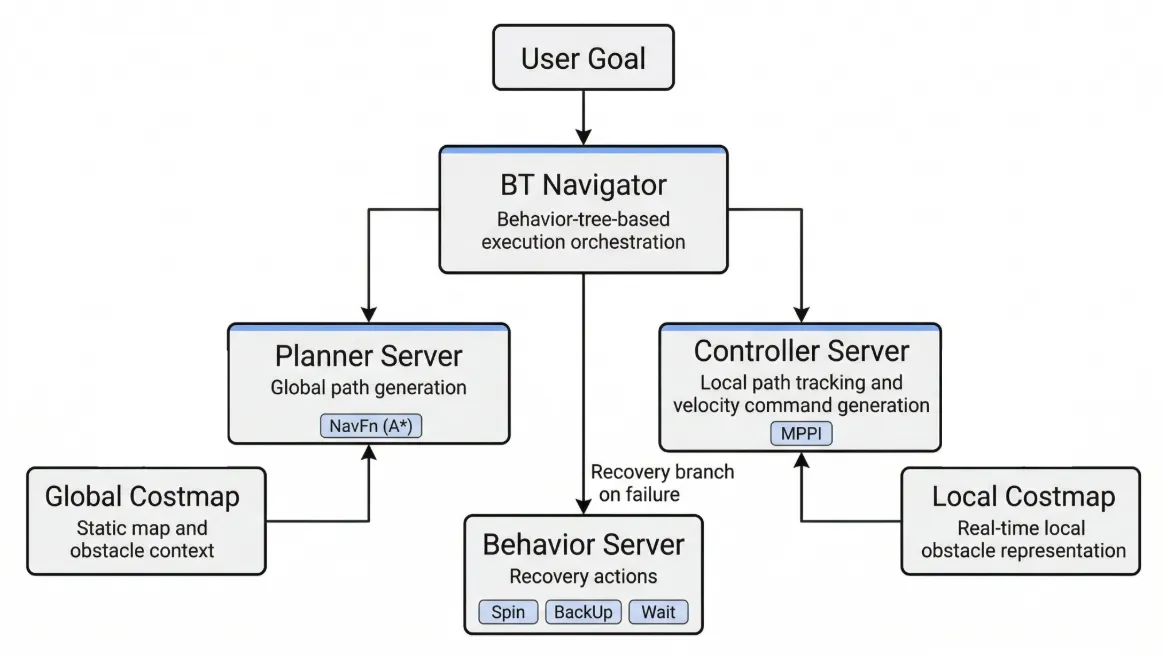
AntBot can perform autonomous navigation using Nav2, the official ROS 2 navigation framework. To run in simulation, 5.3 Simulation Environment Setup must be completed first.
Prerequisites
Section titled “Prerequisites”The Nav2, SLAM Toolbox, robot localization, MPPI, and RPP controller dependencies are declared in antbot_navigation/package.xml, so they can be installed with rosdep from the workspace root.
rosdep install --from-paths src --ignore-src -r -yTo install them manually, use:
sudo apt install ros-humble-navigation2 ros-humble-nav2-bringup \ ros-humble-slam-toolbox ros-humble-robot-localization \ ros-humble-nav2-mppi-controller \ ros-humble-nav2-regulated-pure-pursuit-controllercd ~/ros2_wscolcon build --symlink-install --packages-up-to antbot_navigationsource install/setup.bashLaunch Types
Section titled “Launch Types”| Launch file | Purpose | Features |
|---|---|---|
navigation.launch.py | Autonomous driving with saved map | AMCL + full Nav2 stack |
slam.launch.py | Build map while navigating | SLAM Toolbox (no pre-built map needed) |
localization.launch.py | Localization only | No path planning |
All launch files accept a mode argument to switch between simulation and real robot:
ros2 launch antbot_navigation slam.launch.py mode:=sim # Simulationros2 launch antbot_navigation slam.launch.py mode:=real # Real robotSimulation Mode
Section titled “Simulation Mode”-
Start Gazebo simulation
Terminal window # Terminal 1ros2 launch antbot_gazebo gazebo.launch.py world:=depot -
Start Nav2 navigation
Terminal window # Terminal 2ros2 launch antbot_navigation navigation.launch.py mode:=sim world:=depot -
RViz visualization
Terminal window # Terminal 3rviz2 -d $(ros2 pkg prefix antbot_navigation --share)/rviz/navigation.rviz \--ros-args -p use_sim_time:=true
Save Map
Section titled “Save Map”Save a map generated in SLAM mode:
ros2 run nav2_map_server map_saver_cli -f ~/maps/my_mapTo navigate using the saved map:
ros2 launch antbot_navigation navigation.launch.py mode:=sim \ map:=/path/to/my_map.yamlReal Robot Mode
Section titled “Real Robot Mode”-
Start AntBot bringup
Terminal window # Terminal 1ros2 launch antbot_bringup bringup.launch.py -
Start Nav2 navigation
Terminal window # Terminal 2ros2 launch antbot_navigation navigation.launch.py mode:=real -
RViz visualization (from remote PC)
Terminal window # Terminal 3rviz2 -d $(ros2 pkg prefix antbot_navigation --share)/rviz/navigation.rviz
Save Map
Section titled “Save Map”Save a map generated in SLAM mode:
ros2 run nav2_map_server map_saver_cli -f ~/maps/my_mapTo navigate using the saved map:
ros2 launch antbot_navigation navigation.launch.py mode:=real \ map:=/path/to/my_map.yamlSetting Navigation Goals
Section titled “Setting Navigation Goals”Single Goal
-
In RViz, click 2D Pose Estimate to set the initial position
-
Click Nav2 Goal to specify the target position
Multi-Waypoint Following
-
Open RViz
-
Panels → Add New Panel → select
nav2_rviz_plugins/Navigation2 -
Check Waypoint Mode and click multiple goals on the map
-
Click Start Waypoint Following
Goal via CLI
# Send navigation goal to coordinates (x: 5.0, y: 3.0) in map frameros2 action send_goal /navigate_to_pose nav2_msgs/action/NavigateToPose \ "{pose: {header: {frame_id: 'map'}, pose: {position: {x: 5.0, y: 3.0}}}}"© 2026 ROBOTIS AI. All rights reserved.