4.4 Controller Usage
You can manually control AntBot using a PS5 DualSense controller.
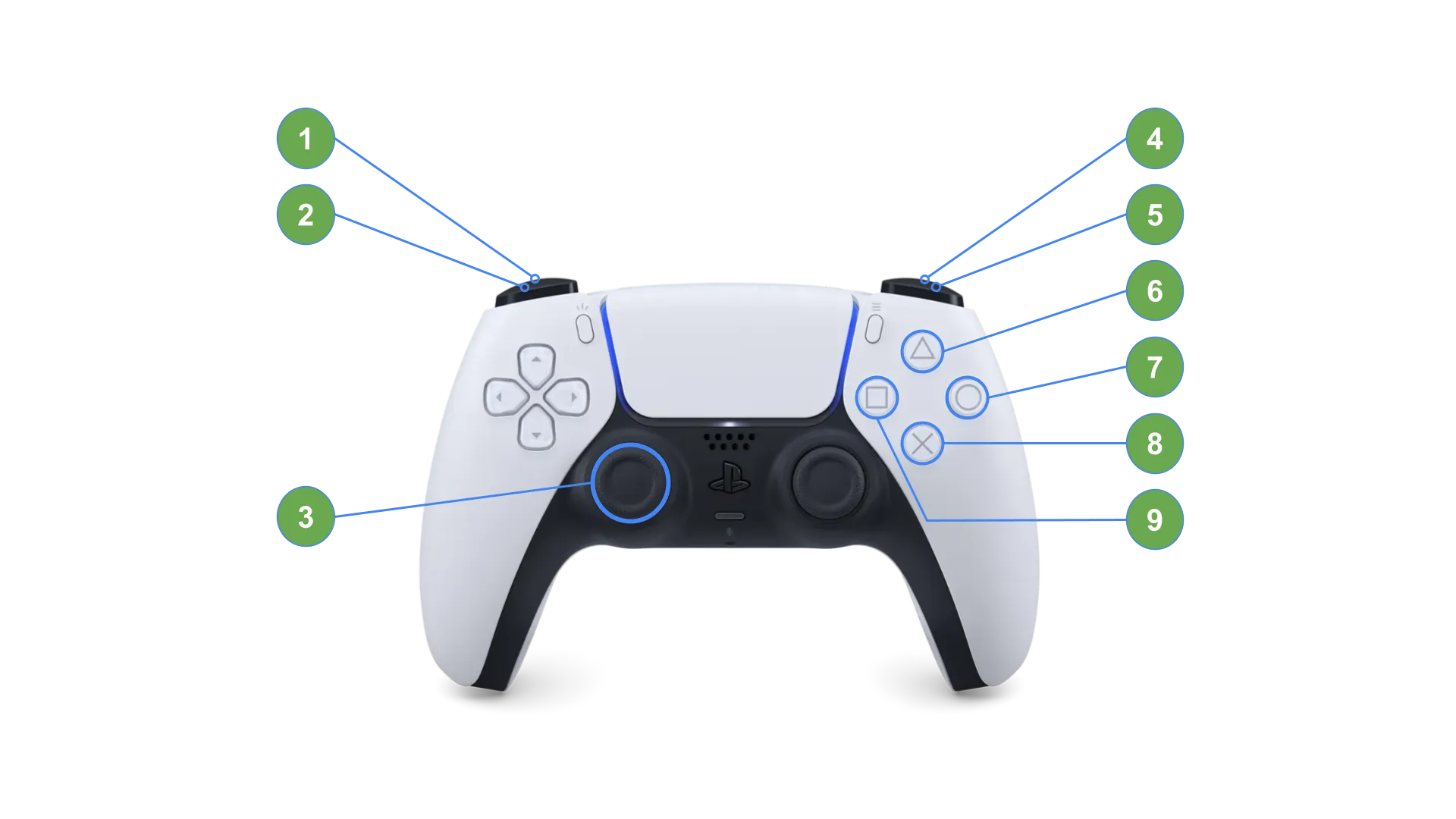
| No. | Name | Action | Notes |
|---|---|---|---|
| 1 | L2 | In-place rotation left | Stationary only, trigger |
| 2 | L1 | Headlight ON / OFF | Toggle |
| 3 | Left Stick | Y-axis: Forward/Reverse, X-axis: Curve driving | Max 1.0 m/s |
| 4 | R2 | In-place rotation right | Stationary only, trigger |
| 5 | R1 | Wiper ON / OFF | Toggle |
| 6 | Triangle | Speed level UP | 1~9 levels |
| 7 | Circle | Cargo Unlock | |
| 8 | Cross | Speed level DOWN | 1~9 levels |
| 9 | Square | Cargo Lock |
Connection Method
Section titled “Connection Method”-
Connect the DualSense controller to USB 1 (Blue) via a wired connection.
-
If AntBot is running, the controller will be automatically recognized. (Takes approximately 2-3 seconds)
-
When the controller LED lights up, it is ready to use.
Speed Levels
Section titled “Speed Levels”Speed levels can be adjusted from 1 to 9, with a default of 3.
| Level | Max Linear Velocity | Max Angular Velocity |
|---|---|---|
| 1 | 0.11 m/s | 0.11 rad/s |
| 3 (Default) | 0.33 m/s | 0.33 rad/s |
| 5 | 0.56 m/s | 0.56 rad/s |
| 9 (Max) | 1.0 m/s | 1.0 rad/s |
Keyboard Teleoperation
Section titled “Keyboard Teleoperation”If a controller is not available, you can also control the robot via keyboard after SSH connection.
ros2 run antbot_teleop teleop_keyboard| Key | Action |
|---|---|
W / X | Forward / Reverse |
A / D | Left / Right movement |
Q / E | Counter-clockwise / Clockwise rotation |
1 ~ 9 | Speed level |
ESC | Exit |
© 2026 ROBOTIS AI. All rights reserved.